info What's Included with ZupCart
- Unified Application — Single Laravel + React codebase containing Customer Web App, Admin Panel, and API
- Customer Web App — React 19 + Vite SPA for buyers to browse, order, and manage accounts
- Admin Panel — Filament 5 dashboard for complete business management
- Laravel 12 API — REST API with authentication and role management
- Multi-Language — 8 languages supported (English, Hindi, Arabic, Tamil, French, German, Spanish, Portuguese)
- Authentication — Login, Register, and OTP-based password reset via phone/email
All core e-commerce features are self-contained with support for multiple payment gateways, SMS services, and PDF generation.
warning Important: Third-Party Services Not Included
Please note: The following third-party services are NOT included with the purchase. You will need to purchase your own subscriptions and API credentials separately:
- Payment Gateways: Stripe, Razorpay, Flutterwave, PayPal
- SMS Services: Twilio, Cheerio
- Location Services: RouteMappy, Google Maps API
- Push Notifications: Firebase
These services require active subscriptions and are the sole responsibility of the buyer to set up and maintain.
info
Unified Application Architecture
ZupCart is a single unified application where the Customer Web App, Admin Panel, and API are all part of the same Laravel + React codebase. No separate installations needed.
Introduction
Welcome to ZupCart, a complete end-to-end single-owner beauty e-commerce platform built with modern technologies. It enables retail shop owners to digitize their business, allowing customers to browse and order beauty products with multiple payment options — all managed through a powerful centralized admin dashboard. Designed for retail businesses looking to launch or scale their e-commerce operations.
Core Features
shopping_bag Customer Web App (React SPA)
- Product Browsing by category, search, filter, sort
- Cart & Wishlist management
- 3-Step Checkout (Address → Payment → Confirmation)
- Real-time order tracking
- User Account with profile, addresses, wallet
- Order history and management
- Multi-Language support (8 languages with RTL)
- Dynamic CMS — Hero sections, banners, blogs, policies
- PDF Invoices via DomPDF
- Promo Codes — Percentage & flat discounts
- Wallet System — Add money, earn referral credits
- Dark Mode & Mobile-First Design
admin_panel_settings Admin Panel Features (Filament)
- Product Management — Categories, items, brands, taxes
- Order Management — View, update, fulfill, cancel, PDF
- Customer Management — List, wallet, addresses, cart
- Purchase Management — Suppliers, purchase orders, returns
- Report System — 9 report types (Stock, P&L, Sales, etc.)
- CMS — Hero sections, banners, FAQs, blogs, policies
- Payment Settings — Stripe, Razorpay, Flutterwave, PayPal
- SMS Settings — Twilio, Cheerio SMS configuration
- RBAC — 886 permissions across 83 entities via Filament Shield
- Excel Import/Export — Bulk data operations
- Multi-Language — Admin panel in 8 languages
featured_play_list Additional Features
- Real-time Order Tracking
- PDF Invoice Generation
- Promo Codes & Discount Coupons
- Wallet & Referral System
- Bulk Data Import/Export (Excel)
- Dynamic CMS Configuration
- Delivery Zone Management
- Barcode Generation
- Customer Ratings & Reviews
- Order Status Flow Management
- Mobile App Onboarding Screens
check_circle
White-Label Solution
This platform is distributed as a white-label solution, allowing complete customization of branding, configurations, categories, and content to match your business requirements.
Getting Started
Third-Party Services Required
warning All third-party services listed below require separate subscriptions and are NOT included with the purchase.
- Stripe — Card payments (requires subscription)
- Razorpay — UPI payments (requires subscription)
- Flutterwave — Card/mobile money (requires subscription)
- PayPal — International payments (requires subscription)
- Twilio — SMS for OTP (requires subscription)
- Cheerio — SMS & WhatsApp Business API (requires subscription)
- RouteMappy — Map tiles & geocoding (requires subscription)
- Google Maps — Maps & places autocomplete (requires subscription)
- Firebase — Push notifications & realtime DB (requires subscription)
- DomPDF — PDF generation (included, no subscription)
- SMTP/Gmail — Transactional emails (requires your credentials)
lightbulb
Prerequisite Knowledge
Basic understanding of React-based website development, Laravel backend setup, API integration, and payment gateway configuration is recommended before installation and customization.
hub Third Party Services
hub Third Party Services & Integrations
ZupCart integrates with essential third-party services to provide payment processing, SMS notifications, PDF generation, location services, and push notifications. These services require configuration with your own API credentials. All core marketplace features are self-contained with support for multiple payment gateways and communication channels.
warning Important: Third-Party Services Require Separate Purchase
Please read carefully: The third-party services listed below are NOT included in the purchase price of ZupCart. You will need to:
- Create accounts with each service provider
- Purchase subscriptions or pay-as-you-go plans as required
- Obtain your own API keys and credentials
- Configure these credentials in the admin panel and/or .env file
These services require active subscriptions and are the sole responsibility of the buyer to set up, maintain, and pay for.
| Service | Status | Purpose | Config Location | Subscription |
|---|---|---|---|---|
| Payment Gateways | ||||
| Stripe | Active | Card payments | .env + DB stripe_key | Required |
| Razorpay | Active | UPI payments (India) | DB razorpay_key (client-side) | Required |
| Flutterwave | Active | Card/mobile money/USSD | .env + DB flutterwave_key | Required |
| PayPal | Partial (Test Mode) | International payments | DB paypal_client_id | Required |
| Notification Services | ||||
| Firebase FCM | Broken | Push notifications | .env FIREBASE_FILE, FIREBASE_DB, FCM_SENDER_ID | Required |
| Firebase RTDB | Active | Real-time order status sync | .env FIREBASE_DB + JSON key | Required |
| Cheerio | Active | SMS + WhatsApp Business API | .env CHEERIO_API_KEY, CHEERIO_BASE_URL | Required |
| Twilio | Active | SMS for OTP & notifications | .env TWILIO_SID, TWILIO_TOKEN, TWILIO_FROM | Required |
| Map & Location Services | ||||
| RouteMappy | Active | Map tiles + geocoding + autocomplete | Hardcoded in constants/constant.js | Required |
| Google Maps | Configured | Maps, geocoding, places autocomplete | Hardcoded in constants/constant.js | Required |
| Protomaps | Active | Map sprites/fonts CDN | CDN URLs in RouteMappy.jsx | Not Required |
| Leaflet + OSM | Active | Admin zone polygon drawing | CDN URLs in Blade views | Not Required |
| PDF / Barcode / Excel | ||||
| DomPDF | Active | PDF generation (invoices, reports, barcodes) | composer.json package | Not Required |
| Picqer Barcode | Active | Barcode SVG generation | composer.json package | Not Required |
| Filament Excel | Active | Admin Excel exports | composer.json package | Not Required |
| Email Services | ||||
| SMTP (Gmail) | Active | Transactional emails | .env MAIL_* | Required |
| Included (No Subscription Required) | ||||
| Laravel Sanctum | Active | API authentication | Laravel default | Not Required |
| Spatie Permission | Active | Role-based access control | config/permission.php | Not Required |
| Filament Shield | Active | Auto-generate admin permissions | config/filament-shield.php | Not Required |
| i18next | Active | Multi-language (8 languages) | resources/react/src/i18n.js | Not Required |
info Important Notice
What's Included (No Subscription): Laravel Sanctum, Spatie Laravel Permission, Filament Shield, Database Queue, DomPDF, Picqer Barcode, Filament Excel, and i18next are all included with the Laravel/Filament installation and require no additional subscriptions or payments.
What You Need to Purchase Separately: You will need your own accounts, subscriptions, and API credentials for the following services: Stripe, Razorpay, Flutterwave, PayPal, Twilio, Cheerio, RouteMappy, Google Maps, and Firebase.
Email Service: SMTP/Gmail credentials are also required and must be provided by the buyer.
Hosting: Web hosting, domain registration, and SSL certificates are the responsibility of the buyer and are not included with the purchase.
warning The buyer is solely responsible for all costs associated with third-party services and subscriptions.
dns Environmental Setup
verified Version Requirements
Ensure the following software versions are installed before proceeding:
Backend Requirements
- PHP: 8.2 or later (8.3+ recommended)
- Laravel: 12.x
- MySQL/MariaDB: 10.4+ (10.6+ recommended)
- Composer: 2.0 or later (2.8+ recommended)
- Apache/Nginx: Latest stable version
Frontend Requirements
- Node.js: 18.0 or later (20.x LTS recommended)
- npm: 9.0 or later (10+ recommended)
- React: 19.x
- Vite: 7.x
- Tailwind CSS: 4.x
Required PHP Extensions
• php-mysql
• php-xml
• php-mbstring
• php-curl
• php-zip
• php-gd
warning
Important:
Using older versions may cause compatibility issues. Always use the
recommended versions.
System Requirements
Operating System:
- Windows 10/11 (64-bit) — Pro or Enterprise recommended
- macOS Monterey (12.0) or later — Sonoma 14.5+ recommended
- Linux (Ubuntu 22.04 LTS, 24.04 LTS, or equivalent)
Minimum Hardware:
- Processor: Intel i5 10th Gen (or AMD Ryzen 5) or better
- RAM: 4 GB (minimum), 8 GB recommended
- Storage: 5 GB free disk space for dependencies and build files
- Internet: Broadband connection required for downloading dependencies
Software Requirements
| Tool/Software | Minimum Version | Recommended Version | Purpose |
|---|---|---|---|
| PHP | 8.2 | 8.3+ | Laravel backend |
| Laravel | 12.0 | 12.x | PHP Framework |
| React | 19.0 | 19.x | UI Library |
| Node.js | 18.0 | 20.x LTS | React & npm scripts |
| MySQL/MariaDB | 10.4 | 10.6+ | Database |
| Composer | 2.0 | 2.8+ | PHP dependency manager |
| npm | 9.0 | 10+ | Package management |
| Vite | 7.0 | 7.x | Build tool & development server |
| Tailwind CSS | 4.0 | 4.x | Utility-first CSS framework |
| Filament | 5.0 | 5.x | Admin Panel Framework |
| Git | 2.30 | Latest | Version control (optional) |
| Modern Browser | Chrome 90+, Firefox 88+, Safari 14+ | Latest version | Testing & debugging |
Laravel Dependencies (composer.json)
        {
            "$schema": "https://getcomposer.org/schema.json",
            "name": "laravel/laravel",
            "type": "project",
            "description": "The skeleton application for the Laravel framework.",
            "keywords": ["laravel", "framework"],
            "license": "MIT",
            "require": {
                "php": "^8.2",
                "barryvdh/laravel-dompdf": "^3.1",
                "bezhansalleh/filament-shield": "^4.2",
                "filament/filament": "~5.0",
                "kreait/firebase-php": "^7.0",
                "laravel/framework": "^12.0",
                "laravel/tinker": "^2.10.1",
                "mcamara/laravel-localization": "*",
                "picqer/php-barcode-generator": "^3.2",
                "pxlrbt/filament-excel": "^3.6",
                "spatie/laravel-permission": "^7.4",
                "spatie/laravel-translatable": "*",
                "stripe/stripe-php": "^21.0",
                "twilio/sdk": "^8.11"
            },
            "require-dev": {
                "fakerphp/faker": "^1.23",
                "laravel/pail": "^1.2.2",
                "laravel/pint": "^1.24",
                "laravel/sail": "^1.41",
                "mockery/mockery": "^1.6",
                "nunomaduro/collision": "^8.6",
                "phpunit/phpunit": "^11.5.3"
            }
        }
summarize Key Laravel Packages
- Filament — Admin panel framework (~5.0)
- Filament Shield — Admin permissions (^4.2)
- Spatie Permission — RBAC (^7.4)
- DomPDF — PDF generation (^3.1)
- Barcode Generator — Picqer (^3.2)
- Filament Excel — Excel import/export (^3.6)
- Stripe — Payment gateway (^21.0)
- Twilio — SMS notifications (^8.11)
- Firebase PHP — Push notifications (^7.0)
- Laravel Localization — Multi-language (*)
- Spatie Translatable — Model translations (*)
React Dependencies (package.json)
        {
            "$schema": "https://www.schemastore.org/package.json",
            "private": true,
            "type": "module",
            "scripts": {
                "build": "vite build",
                "dev": "vite"
            },
            "dependencies": {
                "@fortawesome/fontawesome-svg-core": "^7.0.0",
                "@fortawesome/free-brands-svg-icons": "^7.0.0",
                "@fortawesome/free-solid-svg-icons": "^7.0.0",
                "@fortawesome/react-fontawesome": "^0.2.3",
                "@react-google-maps/api": "^2.20.8",
                "@reduxjs/toolkit": "^2.11.2",
                "axios": "^1.13.5",
                "firebase": "^12.9.0",
                "framer-motion": "^12.23.24",
                "i18next": "^26.3.6",
                "i18next-browser-languagedetector": "^8.2.1",
                "leaflet": "^1.9.4",
                "maplibre-gl": "^5.18.0",
                "rc-slider": "^11.1.9",
                "react": "^19.1.0",
                "react-dom": "^19.1.0",
                "react-helmet-async": "^3.0.0",
                "react-hot-toast": "^2.6.0",
                "react-i18next": "^17.0.11",
                "react-icons": "^5.5.0",
                "react-leaflet": "^5.0.0",
                "react-phone-input-2": "^2.15.1",
                "react-redux": "^9.2.0",
                "react-router-dom": "^7.7.1",
                "react-toastify": "^11.0.5",
                "use-places-autocomplete": "^4.0.1",
                "uuid": "^13.0.0"
            },
            "devDependencies": {
                "@eslint/js": "^9.30.1",
                "@tailwindcss/vite": "^4.1.18",
                "@types/react": "^19.1.8",
                "@types/react-dom": "^19.1.6",
                "@vitejs/plugin-react": "^4.6.0",
                "autoprefixer": "^10.4.21",
                "concurrently": "^9.2.4",
                "eslint": "^9.30.1",
                "eslint-plugin-react-hooks": "^5.2.0",
                "eslint-plugin-react-refresh": "^0.4.20",
                "globals": "^16.3.0",
                "laravel-vite-plugin": "^2.0.0",
                "postcss": "^8.5.6",
                "tailwindcss": "^4.1.18",
                "vite": "^7.0.7"
            }
        }
summarize Key React Packages
- React — UI Library (^19.1.0)
- Redux Toolkit — State management (^2.11.2)
- React Router — Routing (^7.7.1)
- i18next — Multi-language (^26.3.6)
- Framer Motion — Animations (^12.23.24)
- Axios — HTTP client (^1.13.5)
- MapLibre GL — Map rendering (^5.18.0)
- Leaflet — Interactive maps (^1.9.4)
- Firebase — Push notifications (^12.9.0)
- Tailwind CSS — CSS framework (^4.1.18)
- Vite — Build tool (^7.0.7)
- React Icons — Icon library (^5.5.0)
Getting Started Requirements
lightbulb
Note: It's necessary to have a basic knowledge in both server side and frontend development.
- Basic knowledge of React-based website development
- Basic knowledge of Laravel backend setup and API integration
- Understanding of database management (MySQL)
terminal
Verify Your Installation
Run these commands in your terminal/command prompt to confirm all required tools are properly installed:
        # Check Node.js version
        node --version   # Should show v18.x or higher

        # Check npm version
        npm --version    # Should show v9.x or higher

        # Check PHP version
        php --version    # Should show 8.2 or higher

        # Check Composer version
        composer --version  # Should show 2.x or higher

        # Check MySQL version
        mysql --version  # Should show 10.4 or higher
checklist Verify Dependency Files
Check composer.json:
composer show --installed
Check package.json:
npm list --depth=0
check_circle
Success Indicator:
If all commands show the correct versions (or higher), your environment is ready for installation.
error
Troubleshooting:
If any command returns "not found" or shows an older version, please install or update the corresponding software before proceeding.
memory Technology Stack
memory Complete Technology Stack — ZupCart
ZupCart is built using modern and scalable technologies to power the unified Customer Website, Admin Panel, and API operations within a single codebase.
Core Technology Versions
Before installing and running the application, ensure the following technologies and tools are installed with the recommended versions.
| Technology | Version | Purpose |
|---|---|---|
| PHP | 8.3.6 | Server-side language |
| Laravel | 12.56.0 | Backend framework |
| React | 19.1.0 | UI framework (Customer SPA) |
| Filament | ~5.0 | Admin panel |
| Node.js | 20.20.2 | JavaScript runtime |
| npm | 10.8.2 | Package manager |
| Vite | 7.0.7 | Build tool & dev server |
| Tailwind CSS | 4.1.18 | Utility-first CSS framework |
| MySQL | (via XAMPP/LAMPP) | Primary database |
| Category | Technology | Version | Purpose |
|---|---|---|---|
| Backend Core | |||
| Language | PHP | 8.3.6 | Server-side programming |
| Framework | Laravel | 12.56.0 | Backend framework |
| Database | MySQL | (via XAMPP/LAMPP) | Primary relational database |
| Dependency Manager | Composer | 2.x | PHP package management |
| Frontend (Customer Website) | |||
| Framework | React | 19.1.0 | UI library |
| DOM Rendering | React DOM | 19.1.0 | DOM rendering |
| State Management | Redux Toolkit | 2.11.2 | Global state management |
| React-Redux | React Redux | 9.2.0 | React-Redux bindings |
| Routing | React Router DOM | 7.7.1 | Client-side routing |
| Build Tool | Vite | 7.0.7 | Build tool & development server |
| CSS Framework | Tailwind CSS | 4.1.18 | Utility-first CSS framework |
| Animations | Framer Motion | 12.23.24 | UI animations & transitions |
| Map Libraries | MapLibre GL / Leaflet | 5.18.0 / 1.9.4 | Map rendering & location services |
| Internationalization | i18next | 26.3.6 | Multi-language support (8 languages) |
| HTTP Client | Axios | 1.13.5 | API requests |
| Admin Panel | |||
| Admin Framework | Filament | ~5.0 | Admin dashboard |
| RBAC | Spatie Permission | ^7.4 | Role-based access control |
| Admin Security | Filament Shield | ^4.2 | Auto-generate admin permissions |
| Payment Gateways | |||
| Stripe | Stripe PHP SDK | ^21.0 | Card payments |
| Razorpay | Razorpay JS SDK | Client-side | UPI payments (India) |
| Flutterwave | Flutterwave JS SDK | Client-side | Card/mobile money/USSD |
| PayPal | PayPal JS SDK | Client-side | International payments |
| Notification Services | |||
| Firebase | Firebase PHP SDK / JS SDK | ^7.0 / 12.9.0 | Realtime DB & Push notifications (FCM) |
| Twilio | Twilio SDK | ^8.11 | SMS (OTP, verification) |
| Cheerio | Cheerio API | HTTP API | SMS + WhatsApp Business |
| Map / Location Services | |||
| MapLibre GL | maplibre-gl | 5.18.0 | Map rendering engine |
| RouteMappy | RouteMappy API | HTTP API | Map tiles + geocoding |
| Google Maps | @react-google-maps/api | 2.20.8 | Maps + geocoding + places |
| Leaflet | react-leaflet / leaflet | 5.0.0 / 1.9.4 | Admin zone polygon drawing |
| PDF / Barcode / Excel | |||
| DomPDF | barryvdh/laravel-dompdf | ^3.1 | PDF generation (invoices, reports) |
| Barcode | picqer/php-barcode-generator | ^3.2 | Barcode SVG generation |
| Excel | filament-excel | ^3.6 | Admin Excel exports |
| SMTP | Laravel Mail (SMTP) | Built-in | Transactional emails |
| Included (No Subscription) | |||
| Laravel Sanctum | Laravel Sanctum | Built-in | API authentication |
| Spatie Permission | Spatie Laravel Permission | ^7.4 | Role-based access control |
| Localization | mcamara/laravel-localization | * | Server-side locale switching |
| Database Cache | Database Cache | Built-in | Default cache driver |
| Database Queue | Database Queue | Built-in | Default queue driver |
Hosting & Production Server Requirements
- Apache 2.4+ or Nginx 1.18+
- PHP 8.2+ with required extensions (mysql, xml, mbstring, curl, zip, gd)
- MySQL 10.4+ / MariaDB 10.6+
- SSL Certificate (HTTPS) Recommended
- Cron Job Support (for queue worker)
- Minimum 4 GB RAM (8 GB Recommended)
- Minimum 10 GB Available Storage
Important:
Shared hosting, VPS, cloud servers, and dedicated servers are supported as long as the above
requirements are met.
Project Scale
~500+
PHP Files
~100+
React Components
60+
API Endpoints
48+
Database Tables
72
Admin Resources
886
Admin Permissions
8
Languages
15+
Third-Party Services
info
Important Note
Install all required SDKs, development tools, and dependencies using the recommended versions before beginning the installation process. Version mismatches may result in build or runtime issues.
Pro Tip: Use Node Version Manager (NVM) for managing Node.js versions.
view_module Project Dependencies
info Unified Application Overview
ZupCart is a unified application where the Customer Website, Admin Panel, and API are all part of the same Laravel + React codebase. All dependencies are managed within a single project:
language
Customer Website
React 19 SPA with Redux Toolkit
admin_panel_settings
Admin Panel
Laravel 12 + Filament 5
api
API: Laravel 12 REST API with Sanctum authentication (60+ endpoints)
Deployment: Single deployment — Customer Web App, Admin Panel, and API served from the same Laravel installation
language Customer Website Dependencies (React 19)
The customer website is built with React 19 + Redux Toolkit and uses the
following dependencies from package.json:
| Package | Version | Purpose |
|---|---|---|
| Core React | ||
| react | ^19.1.0 | UI Library |
| react-dom | ^19.1.0 | React DOM rendering |
| react-router-dom | ^7.7.1 | Client-side routing & navigation |
| State Management | ||
| @reduxjs/toolkit | ^2.11.2 | Global state management |
| react-redux | ^9.2.0 | React bindings for Redux |
| HTTP & API | ||
| axios | ^1.13.5 | HTTP client for API requests |
| Internationalization (8 Languages) | ||
| i18next | ^26.3.6 | Internationalization framework |
| react-i18next | ^17.0.11 | React bindings for i18next |
| i18next-browser-languagedetector | ^8.2.1 | Browser language detection |
| Maps & Location Services | ||
| maplibre-gl | ^5.18.0 | Map rendering engine |
| leaflet | ^1.9.4 | Interactive maps library |
| react-leaflet | ^5.0.0 | React bindings for Leaflet |
| @react-google-maps/api | ^2.20.8 | Google Maps API integration |
| use-places-autocomplete | ^4.0.1 | Google Places autocomplete hook |
| Firebase Services | ||
| firebase | ^12.9.0 |
Order Status Updates (Realtime DB): Real-time order tracking for
customers Push Notifications (FCM): Order confirmation, dispatch, and delivery alerts |
| UI Components & Utilities | ||
| framer-motion | ^12.23.24 | UI animations & transitions |
| react-icons | ^5.5.0 | Icon library |
| @fortawesome/react-fontawesome | ^0.2.3 | Font Awesome icons for React |
| react-phone-input-2 | ^2.15.1 | Phone number input with country codes |
| react-hot-toast | ^2.6.0 | Toast notifications |
| react-toastify | ^11.0.5 | Toast notifications (alternative) |
| react-helmet-async | ^3.0.0 | Document head manager (SEO) |
| rc-slider | ^11.1.9 | Slider component for price filters |
| uuid | ^13.0.0 | UUID generation for unique identifiers |
| Dev Dependencies | ||
| @vitejs/plugin-react | ^4.6.0 | Vite plugin for React |
| vite | ^7.0.7 | Build tool & dev server |
| tailwindcss | ^4.1.18 | Utility-first CSS framework |
| @tailwindcss/vite | ^4.1.18 | Tailwind CSS Vite plugin |
| eslint | ^9.30.1 | JavaScript linting |
| @types/react | ^19.1.8 | React TypeScript types |
| @types/react-dom | ^19.1.6 | React DOM TypeScript types |
| postcss | ^8.5.6 | CSS processing |
| autoprefixer | ^10.4.21 | CSS vendor prefixes |
| concurrently | ^9.2.4 | Run multiple dev commands simultaneously |
| laravel-vite-plugin | ^2.0.0 | Laravel-Vite integration |
admin_panel_settings Admin Panel & API (Laravel 12) Dependencies
The admin panel and API are built with Laravel 12 and Filament 5, using
the following PHP dependencies from composer.json:
| Package | Version | Purpose |
|---|---|---|
| Core PHP & Laravel | ||
| php | ^8.2 | Server-side scripting language |
| laravel/framework | ^12.0 | Laravel PHP Framework (API & Core) |
| laravel/tinker | ^2.10.1 | Artisan REPL & interactive shell |
| Admin Panel (Filament) | ||
| filament/filament | ~5.0 | Admin panel framework (72 resources) |
| bezhansalleh/filament-shield | ^4.2 | Auto-generate 886 admin permissions |
| Role-Based Access Control | ||
| spatie/laravel-permission | ^7.4 | User roles & permissions management |
| spatie/laravel-translatable | * | Model translations |
| Localization | ||
| mcamara/laravel-localization | * | Server-side locale switching (8 languages) |
| PDF, Barcode & Excel | ||
| barryvdh/laravel-dompdf | ^3.1 | PDF generation (invoices, reports, labels) |
| picqer/php-barcode-generator | ^3.2 | Barcode SVG generation for products |
| pxlrbt/filament-excel | ^3.6 | Excel import/export for admin (bulk operations) |
| Payment Gateways | ||
| stripe/stripe-php | ^21.0 | Stripe card payments integration |
| razorpay/razorpay | (client-side JS SDK) | Razorpay UPI payments |
| flutterwave/flutterwave | (client-side JS SDK) | Flutterwave card/mobile money/USSD |
| SMS & Notifications | ||
| twilio/sdk | ^8.11 | Twilio SMS for OTP, notifications, alerts |
| cheerio/cheerio | (HTTP API) | Cheerio SMS & WhatsApp Business API |
| Firebase (Order Status) | ||
| kreait/firebase-php | ^7.0 |
Realtime Database: Real-time order status updates (admin → customer
sync) FCM Push: Order confirmation, dispatch, delivery notifications |
| Development Dependencies | ||
| fakerphp/faker | ^1.23 | Fake data generation for testing |
| laravel/pail | ^1.2.2 | Log viewer |
| laravel/pint | ^1.24 | PHP code style fixer |
| laravel/sail | ^1.41 | Docker development environment |
| mockery/mockery | ^1.6 | Mocking framework for tests |
| nunomaduro/collision | ^8.6 | Error handling for console |
| phpunit/phpunit | ^11.5.3 | PHP testing framework |
sync_alt Firebase Order Status Flow
How It Works
- Admin updates order status in Filament panel
- Laravel backend updates Firebase Realtime Database
- Customer website listens to Firebase for real-time updates
- Customer sees order status change without page refresh
- FCM push notification sent to customer's device (when configured)
Order Status Flow
Order Placed
→
Confirmed
→
Dispatched
→
Delivered
|
Cancelled
Realtime DB Path: /orders/{order_id}/status
Firebase Config: .env with FIREBASE_FILE,
FIREBASE_DB, FCM_SENDER_ID
summarize Dependency Summary
language
Customer Website (React 19)
- Total Packages: 25+ production + 15 dev
- State Management: Redux Toolkit 2.11.2
- Maps: MapLibre GL 5.18.0 + Leaflet 1.9.4 + Google Maps
- I18n: i18next 26.3.6 (8 languages)
- Firebase: Realtime DB for order status sync
- UI: Framer Motion, React Icons, Phone Input, Toast
admin_panel_settings
Admin Panel & API (Laravel 12)
- PHP: 8.2+ | Laravel: 12.x
- Filament: 5.x (72 resources)
- RBAC: Spatie 7.4 (886 permissions)
- PDF: DomPDF 3.1 | Barcodes: Picqer 3.2
- Excel: Filament Excel 3.6
- Payments: Stripe 21.0, Razorpay, Flutterwave
- SMS: Twilio 8.11, Cheerio API
- Firebase: kreait/firebase-php 7.0 (order status sync)
check_circle
Included: Laravel Sanctum, Spatie Permission, DomPDF, i18next
warning
Requires Subscription: Stripe, Twilio, Cheerio, RouteMappy, Firebase
person Customer Website Guide
web ZupCart Customer Website Guide
Complete guide for customers using the ZupCart single-vendor beauty e-commerce platform. Learn how to browse products, place orders, manage your account, and more.
navigation Quick Navigation
1
Home Page (/)
Landing page that introduces the store and encourages visitors to browse and shop products.
What it shows:
- Announcement Bar: Scrolling offer messages
- Hero Section: Banner images, marketing text, and call-to-action button
- Category Showcase: Top category cards with images and names
- Featured Products: 8-item grid with add-to-cart and favorite buttons (tag=1)
- Promotional Banner: Discount offer with browse button
- Best-Selling Products: Auto-rotating carousel and grid (tag=2)
- Customer Testimonials: Avatars, ratings, and review text
2
Category/Shop Page (/category)
Main product browsing page where customers filter, sort, and find products to purchase.
What it shows:
- Page Header: Title and subtitle
- Left Sidebar: Category filter, brand filter, price range slider, rating filter, availability filter, sort dropdown
- Product Grid: Image, name, rating, price, discount badge, favorite button, add-to-cart button
- Pagination: 50 items per page
3
Product Detail Page (/product/{name})
Shows complete information about a single product so the customer can decide to buy it.
What it shows:
- Image Gallery: Thumbnails with video support
- Product Info: Name, star rating, review count
- Pricing: Price with discount badge and stock status
- Quantity Selector: Plus/minus buttons
- Actions: Add to cart and favorite buttons
- Tabs: Description and reviews
- Related Products: Same category suggestions
4
Cart Page (/cart)
Shows all items the customer has added to their shopping cart and lets them apply discounts before checkout.
What it shows:
- Cart Items: Images, names, prices, quantity controls, remove buttons
- Stock Warnings: Low-stock indicators
- Promo Code: Input with apply button and available promos list
- Order Summary: Subtotal, promo discount, delivery charges, tax, total
- Proceed to Checkout: Button
5
Checkout Address Page (/checkout-address)
Lets the customer select or add a delivery address before proceeding to payment.
What it shows:
- Saved Addresses: List with radio selection
- Add New Address: Modal with form fields
- Edit/Delete: Options for each address
- Cart Summary: Sidebar
6
Checkout Payment Page (/checkout-payment)
Lets the customer choose a payment method and place their order.
What it shows:
- Order Summary: Items, subtotal, tax, promo discount, delivery, total
- Promo Code: Section
- Payment Methods: Stripe, Flutterwave, Razorpay, COD, Wallet
- Place Order: Button
7
Order Confirmed Page (/order-confirmed)
Shows order confirmation details after the customer successfully places an order.
What it shows:
- Success Animation: Green checkmark
- Order ID: With copy button
- Order Items: Images, names, quantities, prices
- Shipping Address: Delivery details
- Payment Summary: Subtotal, tax, delivery, total, payment method
- Actions: Continue Shopping and Track Order buttons
8
Account Dashboard (/account)
Customer's personal dashboard for managing profile, orders, addresses, wallet, and support.
8a. Overview Tab
- Stats Cards: Total Orders, Completed Orders, Wallet Balance, Total Addresses
- Quick Action: Buttons
8b. My Orders Tab
- Filter Tabs: All, Pending, Processing, Shipped, Delivered, Cancelled
- Search Bar: Filter orders
- Order Cards: Expand/collapse, tracking, cancel, invoice download
8c. Addresses Tab
- Address List: Add, edit, delete options
- Address Form: Modal
8d. Wallet Tab
- Balance Display: Current wallet balance
- Transaction History: Paginated list
- Add Money: Amount input with payment gateway selection
8e. Profile Tab
- Profile Form: Name, email, phone, profile picture
- Upload: Profile picture option
8f. Help & Support Tab
- FAQ: Categories and questions in accordion
- Contact: Phone and email
- Message: Input form
9
Wishlist Page (/wishlist)
Shows all products the customer has saved for later purchase.
What it shows:
- Item Count: Header with count
- Sort Dropdown: Recent, price, name
- Category Filter: Pills
- Product Grid: Image, name, rating, price, remove button, add-to-cart
10
Authentication Pages
10a. Login Page
(/login)
- Email Login: Email + password
- Phone Login: Phone + OTP
- Remember Me: Checkbox
- Forgot Password: Link
- Register: Link
- Auth Banner: Image
10b. Register Page
(/register)
- Form: First name, last name, email, password, phone, referral code
- Background Banner: Image
- Register Button: Create account
- Login Link: Back to login
10c. OTP Page (/otp)
- 4-Digit OTP: Auto-fill input
- Auto-Submit: On complete
- Countdown Timer: 30 seconds for resend
- OTP Banner: Image
10d. Forgot/Reset Password
- Forgot Password (
/forgot-password): Phone number input - Reset Password (
/reset-password): New password + confirm - Show/Hide: Toggle password visibility
11
CMS Pages
11a. Contact Page
(/contact)
- Hero Section: Heading and badges
- Contact Methods: Call Us, Email Us, Visit Us
- Contact Form: Name, email, phone, message
- Interactive Map: Store location
- Support Hours: Opening/closing times
11b. Blogs Page
(/blog)
- Page Header: Title and subtitle
- Search Bar: Filter blogs
- Blog Cards: Image, title, excerpt, date, author
- CTA Section: Bottom call-to-action
11c. FAQ Page (/faq)
- Search Bar: Filter FAQs
- Category Tabs: Filter by category
- FAQ Accordion: Expandable with copy-to-clipboard
11d. About Us Page
(/about)
- Hero: Title and subtitle
- About Section: Store name, description, app download card
- Vision/Mission: Cards with values
- Video Section: Uploaded video or thumbnail
- CTA: Contact and shop buttons
11e. Legal Pages
- Privacy Policy (
/privacy): Full privacy policy content - Terms & Conditions (
/terms): Full terms content - Return Policy (
/returns): Return and refund policy - Shipping Policy (
/shipping): Shipping policy
12
Sitewide Elements
12a. Header
- Logo: App name and logo
- Navigation: Home, Shop, Blogs, Contact, About, CMS pages
- Search Bar: Full search
- Wishlist/Cart: Icons with counts
- User Dropdown: Profile, orders, wishlist, help, logout
- Language Selector: 8 languages
- Category Mega-Menu: 4-level nested tree
12b. Footer
- Brand Info: Logo, name, tagline, description, social icons
- Shop Links: First 5 categories
- Company Links: Blogs, Contact, CMS pages
- Support Links: Privacy, Terms, Shipping, Return, FAQ
- Working Hours: Opening/closing times
- Payment Icons: Supported methods
- Copyright: Text
- Contact Info: Address, phone, email
- Badges: "100% Secure", "Fast Delivery"
12c. WhatsApp Icon
- Floating Button: Bottom-right corner
- Pulsing Dot: Red notification indicator
- Tooltip: "Chat with Us" on hover
12d. Google Translate
- Dropdown: 8 languages
- Languages: English, Tamil, Arabic, Hindi, Spanish, French, Portuguese
13
Order Flow (Step by Step)
Complete order flow from browsing to order confirmation.
Step 1: Customer Opens Website
- Lands on Home Page (
/) - Sees hero banner, categories, featured products, promotional banner, best sellers, testimonials
- No login required to browse
Step 2: Customer Browses Products
- Clicks a category → goes to Category Page (
/category?cat=X) - Can filter by brand, price range, rating, availability
- Can search products by name, SKU, or barcode
- Can sort by popularity, price, rating, newest
- Clicks a product → goes to Product Detail Page (
/product/:productName)
Step 3: Customer Views Product
- Sees product images, name, price, stock status, description
- If product has options (variants), selects them
- Chooses quantity
- Clicks "Add to Cart"
Step 4: Add to Cart
- If not logged in → redirected to
/login - If logged in → product added to cart via API
- Cart count updates in header
- CartModal sidebar appears showing added item
- WhatsApp notification sent to customer (abandoned cart reminder)
Step 5: Customer Goes to Cart
- Clicks cart icon in header → goes to Cart Page (
/cart) - Sees all cart items with images, names, prices, quantities
- Can increase/decrease quantity
- Can remove items
- Can apply promo code for discount
- Sees subtotal, tax, delivery charges, total
Step 6: Customer Proceeds to Checkout
- Clicks "Proceed to Checkout" → goes to Address Page (
/checkout-address) - Selects a saved delivery address or adds a new one
- Optionally selects courier/shipping method
- Clicks "Continue" → goes to Payment Page
Step 7: Customer Selects Payment
- Sees order summary (items, subtotal, tax, delivery, total)
- Selects payment method: Cash on Delivery, Wallet, Stripe, Razorpay, Flutterwave
- Clicks "Place Order"
Step 8: Order is Placed (Backend Processing)
- Creates order record in
orderstable - Creates order items in
order_itemstable - Decrements stock from
itemstable - Creates transaction record
- Clears customer's cart
- Sends WhatsApp notification
- Returns order confirmation
Step 9: Order Confirmed
- Customer sees confirmation page with order ID, status, items, total
- Can click "Continue Shopping" to go back to Home
- Back button is blocked to prevent double orders
Step 10: Customer Views Order History
- Goes to Account (
/account) → My Orders tab - Sees all past orders with status, date, total
- Can click an order to see full details
- Can download invoice PDF
- Can track order status
table Page Summary
| Page | URL | Purpose |
|---|---|---|
| Home | / |
Landing page with categories, products, and promotions |
| Category/Shop | /category |
Browse products with filters and sorting |
| Product Detail | /product/{name} |
Complete product information |
| Cart | /cart |
Manage cart and apply discounts |
| Checkout Address | /checkout-address |
Select or add delivery address |
| Checkout Payment | /checkout-payment |
Choose payment method and place order |
| Order Confirmed | /order-confirmed |
Order confirmation details |
| Account Dashboard | /account |
Profile, orders, addresses, wallet, support |
| Wishlist | /wishlist |
Saved products |
| Login | /login |
Sign in to account |
| Register | /register |
Create new account |
| OTP | /otp |
Phone number verification |
| Forgot Password | /forgot-password |
Start password reset |
| Reset Password | /reset-password |
Set new password |
| Contact | /contact |
Contact store |
| Blogs | /blog |
View blog posts |
| FAQ | /faq |
Frequently asked questions |
| About Us | /about |
About the store |
| Privacy Policy | /privacy |
Privacy policy |
| Terms & Conditions | /terms |
Terms and conditions |
| Return Policy | /returns |
Return and refund policy |
| Shipping Policy | /shipping |
Shipping policy |
lightbulb
Pro Tip: Save your frequently used addresses and enable
notifications to receive real-time updates on order status and new products!
admin_panel_settings Admin Panel Guide
Admin Panel Overview
The Admin Panel provides complete control over the ZupCart single-vendor beauty e-commerce platform. Below is the detailed menu structure and functionality for managing the platform.
| Menu Section | Table | Key Columns |
|---|---|---|
| Dashboard | ||
| Dashboard | (aggregated data) | — |
| Customer | ||
| Customers | customers | id, customer_name, profile_picture, email, password, phone_number, phone_with_code, overall_rating, wallet, status |
| Customer Addresses | customer_addresses | id, customer_id, address, landmark, lat, lng, address_type, zone_id, pin_code, city, state, status |
| Customer Wallet Histories | customer_wallet_histories | id, customer_id, type, message, transaction_type, amount |
| Customer Cart Items | customer_cart_items | id, customer_id, product_id, options, qty |
| Customer Promo Histories | customer_promo_histories | id, customer_id, promo_id |
| Favourite Items | favourite_items | id, customer_id, item_id |
| Inventory | ||
| Categories | categories | id, created_by, category_name, category_image, status, description, recommended_by_admin, parent_id |
| Brands | brands | id, brand_name, logo, status |
| Tags | tags | id, tag_name |
| Unit Measurements | unit_measurements | id, unit, status |
| Products (Items) | items | id, item_name, item_description, base_price, in_stock, item_image, stock, special_price, sku, category_id, brand_id, tax_id, unit, purchase_price, wholesale_price |
| Product Catalogue | item_catalogues | id, item_id, image |
| Purchase | ||
| Suppliers | suppliers | id, supplier_name, supplier_image, supplier_email, supplier_phone, gst_type, gst_number, billing_address, wallet, status |
| Purchase Orders | purchase_orders | id, invoice_no, supplier_id, supplier_email, supplier_phone, date, payment_method, sub_total, tax, discount, total, payment_status, status, notes |
| Purchase Returns | purchase_returns | id, purchase_order_id, invoice_no, supplier_id, date, payment_method, sub_total, tax, discount, total, payment_status, status, notes |
| Orders | ||
| Orders | orders | id, customer_id, address_id, total, sub_total, discount, tax, promo_id, delivery_charge, order_type, order_date, status, payment_mode, items, items_data, tracking_number, shipment_status, awb_number |
| Order Items | order_items | id, order_id, item_id, item_name, quantity, price_per_item, total, options |
| Order Statuses | order_statuses | id, slug, status, status_for_customer |
| Barcode Templates | barcode_templates | id, name, page_width, page_height, label_width, label_height, columns, rows, barcode_type, show_product_name, show_sku, show_price, show_brand, show_category, status |
| Promo Codes | promo_codes | id, customer_id, promo_name, promo_code, description, promo_type, discount, min_purchase_price, max_discount_value, redemptions, status |
| Promo Types | promo_types | id, type_name |
| Accounts | ||
| Customer Payments | customer_payments | id, customer_id, type, amount, reference_type, reference_id, payment_type_id, date, notes |
| Payment Modes | payment_modes | id, payment_type_id, slug, payment_name, icon, status |
| Payment Types | payment_types | id, type_name |
| Reports & Transactions | ||
| Transactions | transactions | id, ref_number, type, date, amount, description, payment_method, transaction_type |
| Stock Summary | items | stock, base_price, special_price, category_id, brand_id |
| Sale/Purchase Report | orders + purchase_orders | (aggregated data) |
| Category Wise Stock Summary | items + categories | (grouped by category) |
| Item Wise Profit & Loss | items + transactions | (profit calculation) |
| Purchase Report | purchase_orders | (filtered report) |
| Mode Wise | transactions | (grouped by payment mode) |
| Customer Wise | transactions | (grouped by customer) |
| Product Wise | transactions + items | (grouped by product) |
| Overall Profit and Loss | transactions | (income vs expenses) |
| Settings | ||
| App Settings | app_settings | id, app_name, app_logo, default_currency, currency_short_code, max_cash_allowed, opening_time, closing_time, capital_lat, capital_lng |
| Customer App Settings | customer_app_settings | id, app_name, app_logo, default_currency, currency_short_code, opening_time, closing_time, delivery_charge_per_km, app_version, flutterwave_key, stripe_key, capital_lat, capital_lng |
| Address Types | address_types | id, type_name, icon |
| Zones | zones | id, name, polygon |
| Statuses | statuses | id, slug, status_name |
| Taxes | taxes | id, tax_name, percentage, status |
| Import Excels | import_excels | id, type, file |
| Languages | languages | id, code, name, native_name, dir, is_default, is_active, sort_order |
| Privacy Policies | privacy_policies | id, privacy_type, title, description, status |
| CMS (Site Configs) | site_configs | id, key, value, type |
| Users | users | id, name, email, email_verified_at, password, remember_token |
| Map Settings | map_settings | id, tiles, routing, places, geo_code, reverse_geo_code |
| Website Settings | ||
| Website Settings | website_settings | id, title, description, banner_image, playstore_link, appstore_link, store_image, store_title, store_description, website_color |
| Blogs | blogs | id, title, description, image |
| Contact Settings | contact_settings | id, phone_number, email, address, whatsapp_number |
| FAQ Categories | faq_categories | id, faq_type, icon, category_name, description, status |
| FAQs | faqs | id, question, answer, image, faq_category_id |
| Social Settings | social_settings | id, facebook_link, instagram_link, twitter_link, youtube_link, whatsapp_link, email_link |
| Testimonials | testimonials | id, name, image, message, role, ratings |
| Who We Ares | who_we_ares | id, title, description, image |
| Terms And Conditions | terms_and_conditions | id, user_type, title, description |
| Shipping Policies | shipping_policies | id, title, description, status |
| Refund Policies | refund_policies | id, title, description, status |
| Banners | banners | id, image, badge, title, subtitle, link, status |
| Contact Messages | contact_messages | id, name, email, subject, category, status, created_at |
| Roles & Permissions | ||
| Roles | roles | id, name, guard_name, permissions |
menu Admin Menu Structure
Dashboard
- Dashboard
Customer
- Customers
- Customer Addresses
- Customer Wallet Histories
- Customer Cart Items
- Customer Promo Histories
- Favourite Items
Inventory
- Categories
- Brands
- Tags
- Unit Measurements
- Products (Items)
- Product Catalogue
Purchase
- Suppliers
- Purchase Orders
- Purchase Returns
Orders
- Orders
- Order Items
- Order Statuses
- Barcode Templates
- Promo Codes
- Promo Types
Accounts
- Customer Payments
- Payment Modes
- Payment Types
Reports & Transactions
- Transactions
- Stock Summary
- Sale/Purchase Report
- Category Wise Stock Summary
- Item Wise Profit & Loss
- Purchase Report
- Mode Wise
- Customer Wise
- Product Wise
- Overall Profit and Loss
Settings
- App Settings
- Customer App Settings
- Address Types
- Zones
- Statuses
- Taxes
- Import Excels
- Languages
- Privacy Policies
- CMS (Site Configs)
- Users
- Map Settings
Website Settings
- Website Settings
- Blogs
- Contact Settings
- FAQ Categories
- FAQs
- Social Settings
- Testimonials
- Who We Ares
- Terms And Conditions
- Shipping Policies
- Refund Policies
- Banners
- Contact Messages
Roles & Permissions
- Roles
Key Admin Workflows
Inventory Management
- Create and manage product categories with parent-child relationships
- Manage product brands with logos and status
- Create and manage product tags for better search
- Set up unit measurements (kg, liter, piece, etc.)
- Add and manage all products with images, pricing, stock, and taxes
- Export product catalog with Excel and PDF
- Manage product catalogue with item images
Purchase Management
- Manage suppliers with GST details and wallet
- Create and track purchase orders
- Process purchase returns with payment status tracking
- Export purchase orders and returns with Excel and PDF
- Track supplier payments and balances
Order & Customer Management
- Manage customer accounts, addresses, and wallet histories
- View customer cart items and promo usage history
- Track favourite items for customer personalization
- Manage all customer orders with status workflow
- Download order invoices as PDF
- Export customer data with Excel and PDF
Settings & Configuration
- Configure multi-language support (8 languages)
- Set up map services and delivery zones
- Configure tax rates and rules
- Manage CMS content, privacy policies, and legal pages
- Configure website settings, SEO, and social media
- Import data via Excel for bulk operations
- Manage roles and permissions with Filament Shield
admin_panel_settings
warning
Security Note:
Change default admin password immediately after first
login!
admin_panel_settings Unified Application Configuration
info
PHP Version Requirement
This admin panel requires PHP 8.2+. Please ensure you have the correct version installed before proceeding.
php --version # Should show PHP 8.2.x or higher
folder Project Structure
folder Project Structure
The complete project structure for the ZupCart platform, including both backend (Laravel) and frontend (React) components.
ZupCart/
│
├── app/                              ← Backend Application
│   ├── Console/
│   ├── Filament/                     ← Admin Panel
│   │   ├── Pages/                    ← 18 Page Files
│   │   │   ├── Dashboard.php
│   │   │   ├── StockSummary.php
│   │   │   ├── SalePurchaseReport.php
│   │   │   ├── CategoryWiseStockSummary.php
│   │   │   ├── ItemWiseProfitAndLoss.php
│   │   │   ├── PurchaseReport.php
│   │   │   ├── PaymentModeTransactions.php
│   │   │   ├── CustomerWiseTransactions.php
│   │   │   ├── ItemWiseTransactions.php
│   │   │   ├── ProfitAndLoss.php
│   │   │   ├── LoanReport.php
│   │   ├── Resources/                ← 97 Resource Directories
│   │   │   ├── Customers/
│   │   │   ├── Orders/
│   │   │   ├── Items/
│   │   │   ├── Categories/
│   │   │   ├── Brands/
│   │   │   ├── Taxes/
│   │   │   ├── PaymentModes/
│   │   │   ├── SiteConfigs/
│   │   │   ├── Blogs/
│   │   │   ├── Faqs/
│   │   │   ├── Banners/
│   │   │   └── ... (90+ more)
│   ├── Http/
│   │   ├── Controllers/              ← 19 Controllers
│   │   └── Middleware/
│   ├── Models/                       ← 103 Eloquent Models
│   ├── Providers/
│   │   └── Filament/
│   │       └── AdminPanelProvider.php
├── bootstrap/
│
├── config/                           ← Configuration Files
│
├── database/
│   ├── migrations/                   ← 114 Migrations
│   └── seeders/                      ← 53 Seeders
│
├── public/
│
├── resources/
│   ├── views/
│   │   ├── filament/
│   │   │   ├── pages/                ← 16 Blade Files
│   │   ├── mail_templates/           ← 6 Files
│   │   └── pdf/                      ← 7 Files
│   └── react/                        ← Frontend React App
│       ├── src/
│       │   ├── App.jsx
│       │   ├── main.jsx
│       │   ├── i18n.js
│       │   ├── Theme.js
│       │   ├── Components/           ← 18 JSX Files
│       │   │   ├── Header.jsx
│       │   │   ├── Footer.jsx
│       │   │   ├── SearchComponent.jsx
│       │   │   ├── CartModal.jsx
│       │   │   ├── AddressModal.jsx
│       │   │   ├── WhatsAppIcon.jsx
│       │   │   ├── GoogleTranslate.jsx
│       │   │   ├── Toptoscroll.jsx
│       │   │   ├── NotificationPermission.jsx
│       │   │   ├── AuthGuard.jsx
│       │   │   ├── BarcodePreview.jsx
│       │   │   ├── GoogleMapsComponent.jsx
│       │   │   ├── AutoCompletePlaces.jsx
│       │   │   ├── CurrentLocationFetcher.jsx
│       │   │   ├── RouteMappy.jsx
│       │   │   ├── StaticRoutemappy.jsx
│       │   │   └── Payments/
│       │   │       ├── StripeCheckout.jsx
│       │   │       ├── FlutterwavePayment.jsx
│       │   │       ├── RazorpayButton.jsx
│       │   │       └── PayPalButton.jsx
│       │   ├── Pages/                ← 25 Main Pages
│       │   │   ├── Home.jsx
│       │   │   ├── Category.jsx
│       │   │   ├── Products.jsx
│       │   │   ├── Cart.jsx
│       │   │   ├── Checkout.jsx
│       │   │   ├── Payment.jsx
│       │   │   ├── Orderconfirm.jsx
│       │   │   ├── Wishlist.jsx
│       │   │   ├── Account.jsx
│       │   │   ├── Aboutus.jsx
│       │   │   ├── Blogs.jsx
│       │   │   ├── BlogDetails.jsx
│       │   │   ├── Contact.jsx
│       │   │   ├── Faq.jsx
│       │   │   ├── Privacy.jsx
│       │   │   ├── Terms.jsx
│       │   │   ├── Return.jsx
│       │   │   ├── Shipping.jsx
│       │   │   ├── Refer.jsx
│       │   │   ├── CmsPage.jsx
│       │   │   ├── home/             ← 21 Components
│       │   │   │   ├── HeroSection.jsx
│       │   │   │   ├── CategoryShowcase.jsx
│       │   │   │   ├── FeaturedProducts.jsx
│       │   │   │   ├── BestSellingProducts.jsx
│       │   │   │   ├── PromotionalBanner.jsx
│       │   │   │   ├── TestimonialsSection.jsx
│       │   │   │   ├── DealsSection.jsx
│       │   │   │   ├── RecommendedProducts.jsx
│       │   │   │   ├── ProductsByCategories.jsx
│       │   │   │   ├── AnnouncementBar.jsx
│       │   │   │   └── ... (12 more)
│       │   │   ├── Authpages/        ← 5 Pages
│       │   │   │   ├── Login.jsx
│       │   │   │   ├── Register.jsx
│       │   │   │   ├── Otp.jsx
│       │   │   │   ├── Forget.jsx
│       │   │   │   └── Reset.jsx
│       │   │   └── Dashboard/        ← 8 Sections
│       │   │       ├── DashboardOverview.jsx
│       │   │       ├── MyOrders.jsx
│       │   │       ├── AddressesSection.jsx
│       │   │       ├── WalletSection.jsx
│       │   │       ├── PaymentsSection.jsx
│       │   │       ├── ProfileSection.jsx
│       │   │       ├── HelpSection.jsx
│       │   │       └── Navigation.jsx
│       │   ├── context/              ← 5 Providers
│       │   │   ├── AuthContext.jsx
│       │   │   ├── CartContext.jsx
│       │   │   ├── FavoriteContext.jsx
│       │   │   ├── LanguageContext.jsx
│       │   │   └── ThemeContext.jsx
│       │   ├── locales/              ← 8 Languages
│       │   │   ├── en/translation.json
│       │   │   ├── ar/translation.json
│       │   │   ├── hi/translation.json
│       │   │   ├── ta/translation.json
│       │   │   ├── fr/translation.json
│       │   │   ├── de/translation.json
│       │   │   ├── es/translation.json
│       │   │   └── pt/translation.json
│       │   ├── constants/
│       │   │   └── constant.js
│       │   ├── layers/
│       │   │   └── Layers.js
│       │   └── route/
│       │       └── ProtectedRoute.jsx
│       └── package.json
│
├── routes/
│   ├── web.php                       ← 10 Routes
│   └── api.php                       ← 162 API Routes
│
├── storage/
├── tests/
│
├── .env                              ← Environment Configuration
├── .env.example
├── artisan
├── composer.json
└── README.md
Backend Summary
- Filament Pages: 18
- Filament Resources: 97
- Models: 103
- Controllers: 19
- Migrations: 114
- Seeders: 53
- API Routes: 162
- Web Routes: 10
Frontend Summary
- Main Pages: 25
- Home Components: 21
- Auth Pages: 5
- Dashboard Sections: 8
- UI Components: 18
- Context Providers: 5
- Languages: 8
- Payment Gateways: 4 (Stripe, Flutterwave, Razorpay, PayPal)
info
Note: The project uses a single-owner architecture with support for customers, suppliers, and purchase management. The admin panel is built with Filament v5, while the frontend is a React SPA with multilingual support (8 languages).
Installation Steps
admin_panel_settings Part 1: Admin Panel (Laravel Filament)
Set up the Laravel backend and Filament admin panel
-
1
Unzip the Source Folder
Extract the downloaded source files to your working directory.
-
2
Copy to XAMPP
Copy the admin folder and paste it inside
XAMPP → htdocs. Rename your project folder (e.g., ZupCart).infoVerify XAMPP & Composer: Ensure XAMPP and Composer are already installed. If not, download them from apachefriends.org and getcomposer.org. -
3
Open Command Prompt
Navigate to your project folder:
cd C:\xampp\htdocs\ZupCart -
4
Install PHP Dependencies
Run the following command to install all PHP dependencies:
composer installWhen finished, verify the
vendorfolder has been created in your project. -
5
Create Database
Follow these steps in phpMyAdmin:
- Open
http://localhost/phpmyadminin your browser - Click "New"
- Enter your database name (e.g.,
zupcart_db) - Click "Create"
- Open
-
6
Import Database
Import the SQL file located at
database/zupcart.sqlusing phpMyAdmin:- In phpMyAdmin, select your newly created database
- Click the "Import" tab
- Choose the
zupcart.sqlfile from your project - Click "Go"
-
7
Generate Application Key
Run the following command to generate a unique application key:
php artisan key:generateinfoKey Generate: This command generates a unique application key that is used for encryption and security purposes. -
8
Configure .env File
If
.envfile is not visible, enable "show hidden files" in your system settings. Update the.envfile in your project root with the following settings:Application Settings
APP_NAME=enter_your_app_name APP_ENV=local APP_DEBUG=true APP_URL=http://127.0.0.1:8000 APP_TIMEZONE=Asia/KolkataDatabase Configuration
DB_CONNECTION=mysql DB_HOST=127.0.0.1 DB_PORT=3306 DB_DATABASE=enter_your_database_name DB_USERNAME=root DB_PASSWORD= DB_SOCKET=/opt/lampp/var/mysql/mysql.sockMail Configuration
MAIL_MAILER=smtp MAIL_HOST=enter_your_smtp_host MAIL_PORT=587 MAIL_USERNAME=enter_your_email@example.com MAIL_PASSWORD=enter_your_email_password_or_app_password MAIL_ENCRYPTION=tls MAIL_FROM_ADDRESS=enter_your_email@example.com MAIL_FROM_NAME="${APP_NAME}"Stripe Payment Gateway
STRIPE_SECRET=enter_your_stripe_secret_keyFlutterwave Payment Gateway
FLUTTERWAVE_SECRET=enter_your_flutterwave_secret_keyTwilio SMS Settings
TWILIO_ACCOUNT_SID=enter_your_twilio_sid TWILIO_AUTH_TOKEN=enter_your_twilio_token TWILIO_PHONE_NUMBER=enter_your_twilio_numberCheerio SMS Settings
CHEERIO_API_KEY=enter_your_cheerio_api_key CHEERIO_BASE_URL=enter_your_cheerio_base_urlFirebase Configuration
Firebase is required for push notifications, real-time database features, and other Firebase services. Before using the application, configure your own Firebase project.
Step 1: Download Firebase Service Account
- Open the Firebase Console.
- Select your Firebase Project.
- Go to Project Settings → Service Accounts.
- Click "Generate New Private Key".
- A JSON file will be downloaded (Example:
your-app-name-firebase-adminsdk.json).
Step 2: Upload the JSON File
Copy the downloaded Firebase JSON file into the following directory:
config/your-app-name.jsonStep 3: Update the .env File
FIREBASE_FILE=your-app-name.json FIREBASE_DB=https://your-project.firebaseio.com FCM_SENDER_ID=enter_your_fcm_sender_id FCM_SERVER_KEY=enter_your_fcm_server_keycheck_circleFirebase Connected
Once the JSON file is uploaded and the
.envvalues are updated, the application will automatically connect to your Firebase project.shieldSecurity Notice
Never share your Firebase Service Account JSON file or upload it to a public Git repository. This file contains sensitive credentials with administrative access to your Firebase project.
warningImportant: Replace all placeholder values with your actual credentials before running the application.
-
9
Configure Timezone
Open
config/app.phpand update the timezone based on your region:'timezone' => env('APP_TIMEZONE', 'Asia/Kolkata'),You can also set the timezone in your
.envfile:APP_TIMEZONE=Asia/KolkatainfoTimezone Options: Common timezone values include:Asia/Kolkata— India Standard Time (IST)America/New_York— Eastern Time (ET)America/Los_Angeles— Pacific Time (PT)Europe/London— Greenwich Mean Time (GMT)Europe/Paris— Central European Time (CET)Australia/Sydney— Australian Eastern Time (AET)Asia/Dubai— Gulf Standard Time (GST)Asia/Singapore— Singapore Time (SGT)
-
10
Run Migrations
Run the following command to create the database tables:
php artisan migrate -
11
Seed the Database
Run the following command to seed the database with default data:
php artisan db:seed --forceinfoThe--forceflag is used to run the seeder in production environments. For local development, you can omit it. -
12
Generate Shield Permissions
Run the following command to generate all Shield permissions:
php artisan shield:generate --all --option=permissions --panel=adminAfter generating permissions, run this command to assign the super admin role to your admin user:
php artisan tinker --execute=" $role = DB::table('roles')->where('name','super_admin')->first(); $perms = DB::table('permissions')->pluck('id')->toArray(); $rows = array_map(fn($id) => ['permission_id'=>$id,'role_id'=>$role->id], $perms); DB::table('role_has_permissions')->insertOrIgnore($rows); DB::table('model_has_roles')->insertOrIgnore(['role_id'=>1,'model_type'=>'App\\Models\\User','model_id'=>1]); echo 'Done: Admin assigned to super_admin role'; "infoShield: This generates all necessary permissions and assigns the super_admin role to the admin user (ID: 1). -
13
Optimize the Application
Run the following command to optimize the application for production:
php artisan optimize -
14
Configure React Environment
Create a
.envfile in thewebsitefolder and add the following configurations:# API Configuration (Points to the admin backend) APP_NAME=YourApplication APP_ENV=local APP_KEY=base64:YOUR_APP_KEY APP_DEBUG=true APP_URL=http://127.0.0.1:8000 WEB_URL=https://yourwebsite.com APP_LOCALE=en APP_FALLBACK_LOCALE=en APP_FAKER_LOCALE=en_US APP_MAINTENANCE_DRIVER=file BCRYPT_ROUNDS=12 LOG_CHANNEL=stack LOG_LEVEL=debug DB_CONNECTION=mysql DB_HOST=127.0.0.1 DB_PORT=3306 DB_DATABASE=your_database DB_USERNAME=your_username DB_PASSWORD=your_password SESSION_DRIVER=database SESSION_LIFETIME=120 SESSION_ENCRYPT=false SESSION_PATH=/ SESSION_DOMAIN=null BROADCAST_CONNECTION=log FILESYSTEM_DISK=public QUEUE_CONNECTION=database CACHE_STORE=database REDIS_CLIENT=phpredis REDIS_HOST=127.0.0.1 REDIS_PORT=6379 MAIL_MAILER=smtp MAIL_HOST=your_mail_host MAIL_PORT=587 MAIL_USERNAME=your_mail_username MAIL_PASSWORD=your_mail_password MAIL_FROM_ADDRESS=noreply@example.com MAIL_FROM_NAME="${APP_NAME}" AWS_ACCESS_KEY_ID= AWS_SECRET_ACCESS_KEY= AWS_DEFAULT_REGION=your-region AWS_BUCKET= VITE_APP_NAME="${APP_NAME}" FIREBASE_CREDENTIALS= FIREBASE_DATABASE_URL= FCM_SENDER_ID= APP_MODE=LIVE CHEERIO_API_KEY= CHEERIO_BASE_URL= STRIPE_SECRET=your_stripe_secret_key FLUTTERWAVE_SECRET=your_flutterwave_secret_keywarningwarningImportant:- Update all placeholder values in the
.envfile before running the application. - Set
APP_URLto your application's domain or local URL. - Configure your Firebase credentials and upload the correct Firebase Service Account JSON file.
- Configure your payment gateway credentials (Razorpay, Flutterwave, Paystack) only if you plan to use those services.
- Replace the RouteMappy API URL and Map Key with your own credentials.
- After making changes to the
.envfile, runphp artisan optimize:clearfollowed byphp artisan optimize.
- Update all placeholder values in the
-
15
Serve Laravel Backend
In a separate terminal, navigate to the admin project root and serve the Laravel backend:
php artisan serveThe Laravel backend runs at
http://localhost:5173 -
16
Access the Applications
- Admin Panel: http://localhost:5173/admin
- React Website: http://localhost:5173
infoDefault Login:- Email:
admin@gmail.com - Password:
admin
web Part 2: React Website (Frontend)
Set up the React frontend website located inside the admin project
terminal Complete Setup Quick Reference
Run these commands in sequence to set up both admin panel and website:
admin_panel_settings Admin Panel Setup
# Navigate to admin project
    cd C:\xampp\htdocs\Zupkart_admin

    # Install PHP dependencies
    composer install

    # Generate application key
    php artisan key:generate

    # Run migrations
    php artisan migrate

    # Seed the database
    php artisan db:seed --force

    # Generate Shield permissions
    php artisan shield:generate --all --option=permissions --panel=admin

    # Optimize the application
    php artisan optimize

    # Start Laravel server (in one terminal)
    php artisan serve
web React Website Setup
# Navigate to website folder
    # Create .env file with configurations
    # (Copy .env.example to .env and update values)
Troubleshooting
settings Environment Configuration Issues
If the application is not working correctly, verify:
- The
.envfile exists in the project root. - All required environment variables have been updated with your own credentials.
- The
APP_URLpoints to your application URL. - The
APP_TIMEZONEis correctly set. - Run
php artisan optimize:clearafter modifying the.envfile.
storage Database Connection Issues
Verify the following:
- MySQL service is running.
- The database exists in phpMyAdmin.
- Database credentials in the
.envfile are correct. - The
DB_SOCKETpath is correct for your system. - Run
php artisan migrateif the tables have not been created.
folder_off Image & File Upload Issues
If uploaded images or files are not displayed:
- Run
php artisan storage:link. - Ensure the
storagedirectory has write permission. - Verify the
FILESYSTEM_DISKis set topublic. - Clear the application cache using
php artisan optimize:clear.
payments Payment Gateway Issues
If payment processing is not working:
- Verify the API keys in your
.envfile are correct. - Ensure the payment gateway is enabled in the admin settings.
- Check that the currency and amount are supported by the payment gateway.
- For test mode, use the appropriate test credentials.
sms SMS Services Issues
If SMS notifications are not working:
- Verify the Twilio/Cherrio credentials in the
.envfile are correct. - Ensure the phone number is in the correct format (with country code).
- Check if the SMS service account has sufficient balance.
- Verify the SMS template is properly configured.
notifications_active Firebase Notification Issues
If push notifications are not working:
- Verify the Firebase Service Account JSON file is placed in the correct location.
- Ensure the Firebase values in the
.envfile are correct. - Confirm that your Firebase project has Cloud Messaging enabled.
- Verify the
FCM_SERVER_KEYis correct.
cached Configuration & Cache Issues
If recent changes are not reflected:
- Run
php artisan optimize:clear. - Run
php artisan optimize. - Restart the Laravel server using
php artisan serve. - Clear the browser cache and local storage.
palette Website Customization Guide
sync Edit Any Website Content from Admin Panel
This guide shows you exactly where to edit every piece of content on your website. Simply navigate to the specified admin section, make your changes, and they'll appear on the frontend instantly — no coding required!
navigation Jump to Section
home Home Page
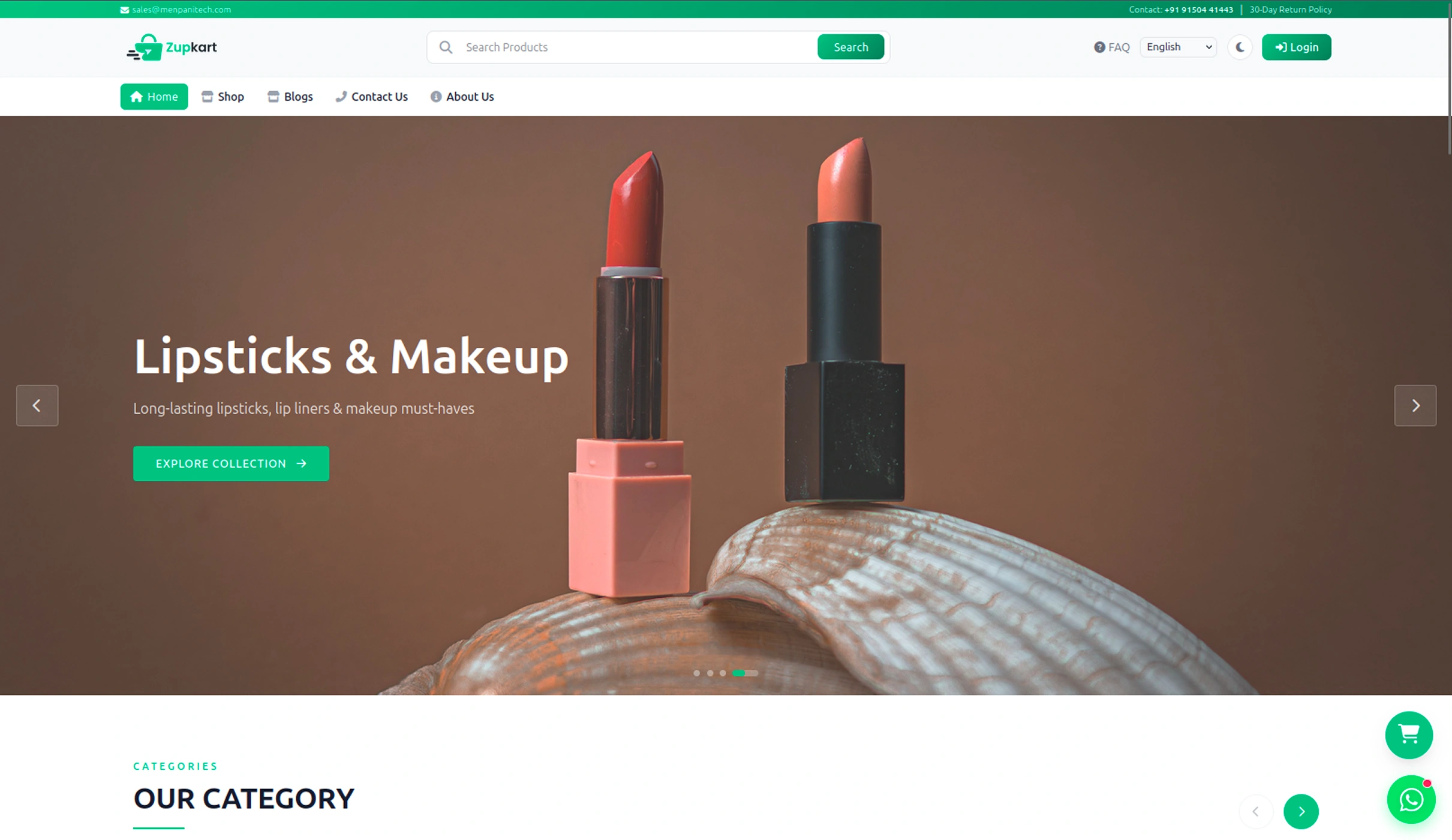
Home Page — Manage banners, categories, featured products, and testimonials
| What to Edit | Where to Find It in Admin | What Changes |
|---|---|---|
| Hero Banner Images | Website Settings → Banners | The sliding banner images at the top |
| Hero Text Content | Settings → CMS → "Hero Section Content" | Badge, heading, description, and button text |
| Hero Watermark Text | Settings → CMS → "Hero Watermark Text" | Background watermark text on hero section |
| Announcement Bar | Settings → CMS → Announcement Keys | Scrolling messages at the top of the page |
| Category Showcase | Inventory → Categories | Category images, names, and display order |
| Category Section Title | Settings → CMS → "Category Section Content" | Badge and title above categories |
| Featured Products | Inventory → Products → Set item_tag = 1 |
Products shown in "Featured" section |
| Featured Section Title | Settings → CMS → "Product Trending Content" | Badge and title above featured products |
| Promotional Banner | Settings → CMS → "Promo Banner Content" | Mid-page banner image, badge, title, description |
| Best Sellers | Inventory → Products → Set item_tag = 2 |
Products shown in "Best Sellers" section |
| Customer Testimonials | Website Settings → Testimonials | Customer reviews, names, photos, and ratings |
inventory_2 Product Pages
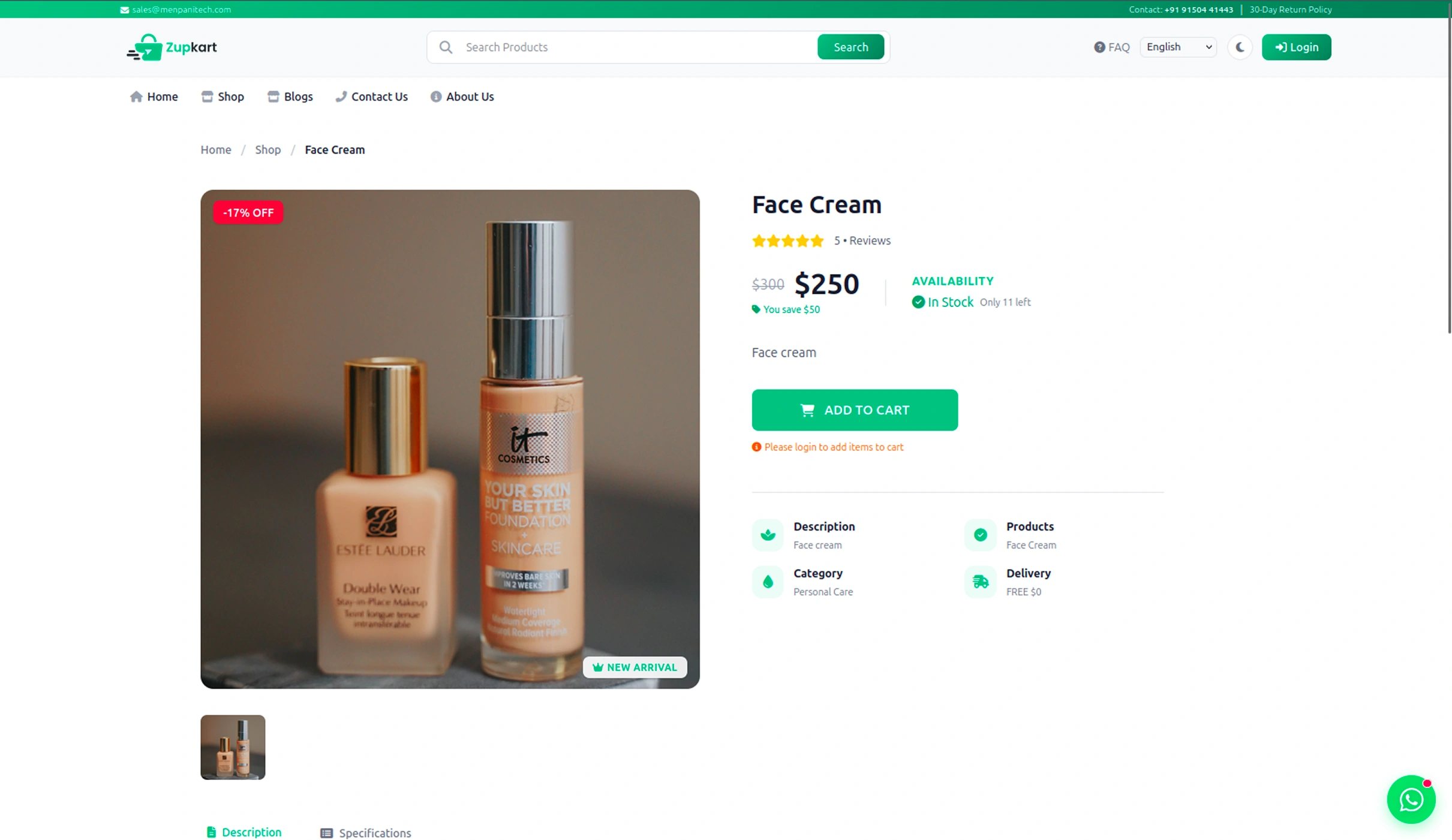
Product Detail Page — Manage product information, images, pricing, and variants
| What to Edit | Where to Find It in Admin | What Changes |
|---|---|---|
| Product Name | Inventory → Products → item_name |
Product title on detail and listing pages |
| Product Description | Inventory → Products → item_description |
Detailed product description |
| Product Images | Inventory → Products (Main Image) + Inventory → Product Catalogue (Gallery) | Main product image and additional gallery images |
| Product Videos | Inventory → Products → YouTube/Facebook/Instagram links | Video embeds on product detail page |
| Product Price | Inventory → Products → base_price, special_price |
Regular and discounted prices |
| Product Stock | Inventory → Products → stock, in_stock |
Stock count and availability status |
| Product Options (Size/Variant) | Settings → Product Options → item_options |
Variant options with individual prices |
| Product Category | Inventory → Products → category_id |
Which category the product belongs to |
| Product Brand | Inventory → Products → brand_id |
Brand name displayed on product |
| Product Unit | Inventory → Products → unit |
Unit of measurement (kg, pcs, liters, etc.) |
| Product Tag | Inventory → Products → item_tag |
Tag as Featured (1) or Best Seller (2) |
| Product Tax | Inventory → Products → tax_id |
Tax rate applied to the product |
| Related Products | Auto-populated from same category → Inventory → Products | Products shown in "You May Also Like" section |
| Product Rating | Auto-calculated from Orders → Order Ratings | Star rating shown on product cards |
storefront Shop & Category Page
Shop/Category Page — Manage product listings, filters, and sorting
| What to Edit | Where to Find It in Admin | What Changes |
|---|---|---|
| Shop Page Title | Settings → CMS → "Shop Page Content" | Title and subtitle at top of shop page |
| Category Filters | Inventory → Categories | Category list with product counts in sidebar |
| Brand Filters | Inventory → Brands | Brand list with product counts in sidebar |
| Product Listings | Inventory → Products | All products displayed in the shop grid |
| Price Range Filter | Auto from Inventory → Products prices | Min/max price slider values |
shopping_cart Cart & Checkout
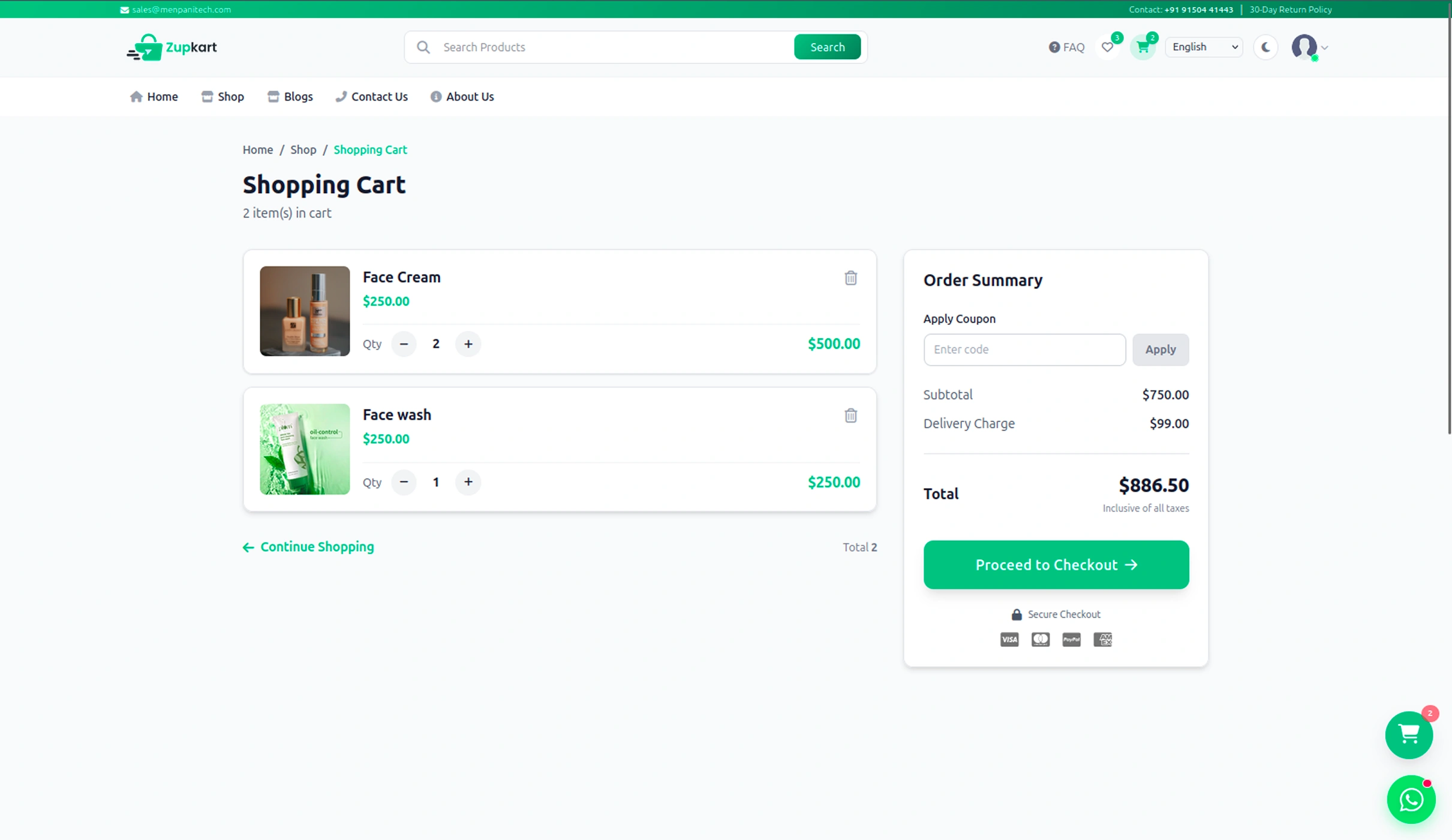
Cart Page — Manage cart items, promo codes, and checkout settings
| What to Edit | Where to Find It in Admin | What Changes |
|---|---|---|
| Promo Codes | Orders → Promo Codes | Discount codes customers can apply at checkout |
| Payment Methods | Accounts → Payment Modes | Payment options shown at checkout (COD, Card, etc.) |
| Payment Method Icons | Accounts → Payment Modes → icon |
Icons displayed next to payment methods |
| Delivery Charge | Settings → Customer App Settings → delivery_charge_per_km |
Delivery fee calculated based on distance |
| Store Location | Settings → Customer App Settings → capital_lat, capital_lng |
Origin point for delivery distance calculation |
| Tax Rates | Settings → Taxes | Tax name and percentage applied to products |
| Address Types | Settings → Address Types | Labels for address types (Home, Office, Other) |
| Order Status Messages | Orders → Order Statuses → status_for_customer |
Text shown to customer for each order status |
account_circle Account Dashboard
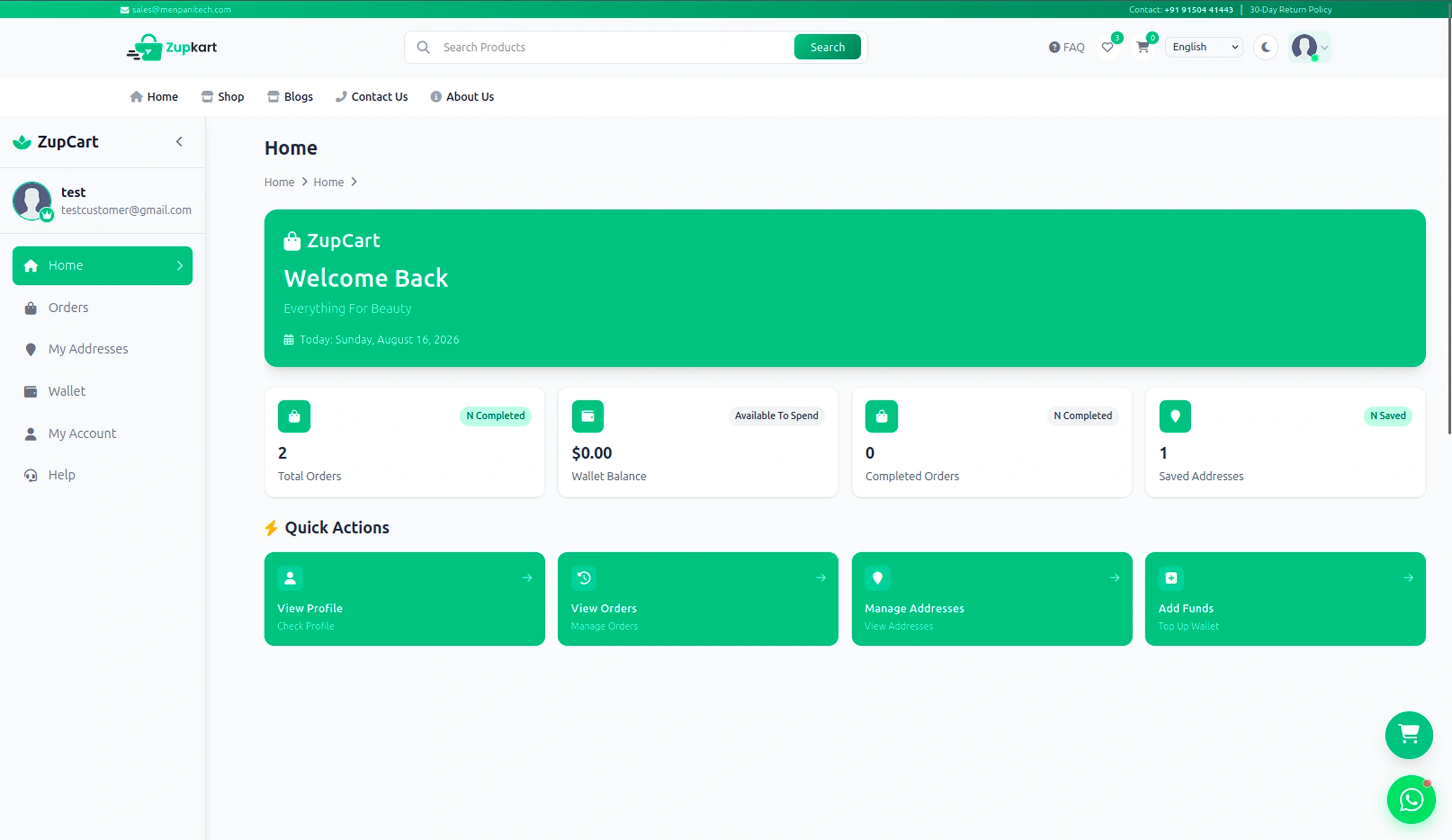
Account Dashboard — Manage customer orders, addresses, wallet, and profile
| What to Edit | Where to Find It in Admin | What Changes |
|---|---|---|
| Customer Orders | Orders → Orders | All orders visible in customer's order history |
| Order Status Options | Orders → Order Statuses | Filter options on order history page |
| Invoice Logo | Settings → Customer App Settings → app_logo |
Logo on downloadable invoice PDFs |
| Invoice Address | Website Settings → Contact Settings | Store address on invoice PDFs |
| Customer Addresses | Customer → Customer Addresses | Saved addresses in customer's account |
| Wallet Balance | Customer → Customers → wallet |
Customer's wallet balance displayed |
| Transaction History | Customer → Customer Wallet Histories | Credit/debit records in wallet |
| Customer Profile | Customer → Customers | Name, email, phone, photo on account page |
| FAQ in Help Tab | Website Settings → Faq Categories + FAQs | Questions and answers in help section |
| Contact Info in Help Tab | Website Settings → Contact Settings | Phone and email in help section |
description Content Pages (Blog, About, Contact, Policies)
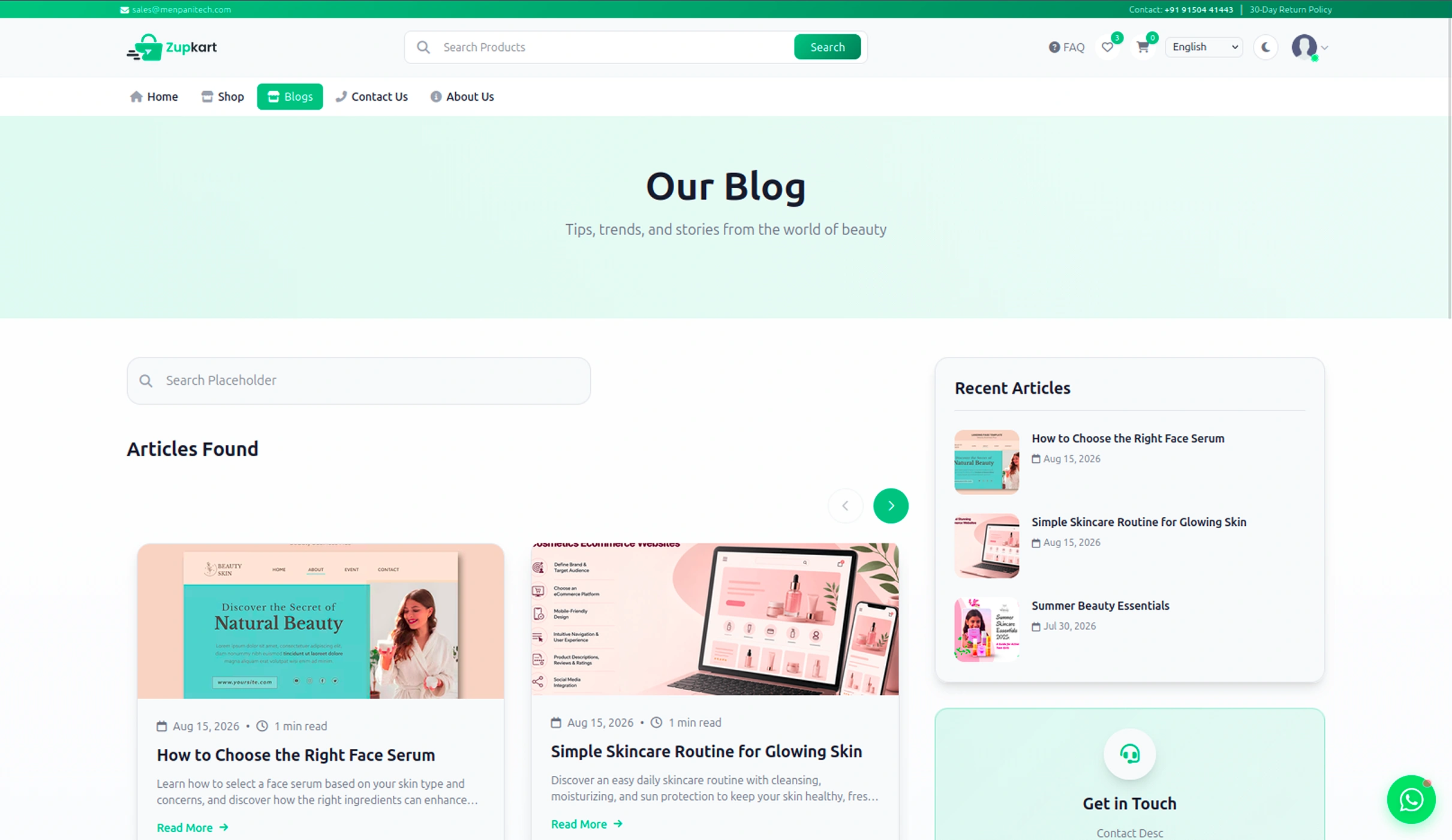
Blog Page — Manage blog posts, About Us, Contact, FAQs, and policy pages
| Page | Where to Find It in Admin | What Changes |
|---|---|---|
| Blog Posts | Website Settings → Blogs | Blog title, content, images, and metadata |
| About Us | Website Settings → Who We Ares | About page content, images, and mission |
| Contact Page | Website Settings → Contact Settings | Phone, email, address, and map location |
| FAQ Page | Website Settings → Faq Categories + FAQs | Categories, questions, and answers |
| Privacy Policy | Website Settings → Privacy Policies | Privacy policy content and last updated date |
| Terms & Conditions | Website Settings → Terms And Conditions | Terms and conditions content |
| Shipping Policy | Website Settings → Shipping Policies | Shipping rules and information |
| Refund/Return Policy | Website Settings → Refund Policies | Refund and return policy content |
| Social Media Links | Website Settings → Social Settings | Facebook, Instagram, Twitter, YouTube links |
settings Global Settings (Affect All Pages)
Global Settings — Manage app name, logo, theme color, currency, and more
| Setting | Where to Find It in Admin | What It Controls |
|---|---|---|
| App Name | Settings → Customer App Settings → app_name |
Site title in header and browser tab |
| App Logo | Settings → Customer App Settings → app_logo |
Logo displayed in header and invoices |
| Theme Color | Website Settings → Website Settings → website_color |
Primary color for buttons, links, and accents |
| Currency Symbol | Settings → Customer App Settings → default_currency, currency_short_code |
Currency shown throughout the site (₹, $, etc.) |
| Store Location | Settings → Customer App Settings → capital_lat, capital_lng |
Origin for delivery distance calculation |
| Delivery Charge | Settings → Customer App Settings → delivery_charge_per_km |
Delivery fee per kilometer |
| Store Pin Code | Settings → Customer App Settings → pin_code |
Store's pincode for shipping |
| Languages | Settings → Languages | Available languages in header selector |
| Payment Gateway Keys | Settings → Customer App Settings → razorpay_key, flutterwave_key, stripe_key |
API keys for online payment processing |
| Footer Tagline | Settings → CMS → "Footer Section Content" | Tagline text in footer |
| Footer Contact Info | Website Settings → Contact Settings | Phone, email, address in footer |
| Footer Social Links | Website Settings → Social Settings | Social media icons and links in footer |
| Copyright Text | Website Settings → Contact Settings | Copyright notice in footer |
| Navigation Menu Labels | Settings → CMS → nav_*_label keys |
Text on navigation menu items |
quick_reference
Quick Reference: Most Common Edits
Change Text Content
Go to Settings → CMS → Find the content key you want to edit
Update Images
Go to Website Settings → Banners or Inventory → Products
Edit Product Details
Go to Inventory → Products → Select the product
Change Theme Color
Go to Website Settings → Website Settings → website_color
Update Policy Pages
Go to Website Settings → Choose the policy type
Manage Social Links
Go to Website Settings → Social Settings
sync_alt
How It Works
Everything you see on the website is controlled from the admin panel. Add, edit, or delete content in the admin, and it reflects on the frontend instantly. No code changes required for content management.
- Add a product → It appears in the shop instantly
- Edit the About Us → The page updates immediately
- Change the theme color → The entire site updates
- Upload a new logo → It updates site-wide
- Create a promo code → Customers can use it right away
- Add a blog post → It's live on the blog page
help_outline FAQ & Troubleshoot
help Frequently Asked Questions & Troubleshooting
Find answers to common questions and solutions to frequently encountered issues during installation, configuration, and daily operation of ZupCart platform.
info
Unified Application: Both Admin Panel and Customer Website are served from the same domain
Admin URL: https://yourdomain.com/admin | Website
URL: https://yourdomain.com
navigation Jump to Section
install_desktop Installation & Setup FAQs
1. Composer Install Failed
Cause: Missing or outdated PHP version, or unstable internet connection.
Solution:
- Ensure PHP (8.2+) is installed and updated.
- Open terminal inside the project root directory.
- Run
composer install - If the issue persists, clear cache and reinstall:
rm -rf vendor composer.lock
composer install
2. Environment Variables Not Configured
Cause: Missing or incomplete environment
configuration in .env file.
Solution:
- Copy
.env.exampleto.env. - Configure all required values:
APP_NAME=ZupCart
APP_URL=https://yourdomain.com
APP_TIMEZONE=Asia/Kolkata
DB_DATABASE=zupcart_db
DB_USERNAME=root
DB_PASSWORD=
MAIL_HOST=smtp.gmail.com
MAIL_USERNAME=your_email@gmail.com
MAIL_PASSWORD=your_app_password
- Run
php artisan optimize:clearafter updating.env. - Restart the Laravel server.
3. Admin Panel 500 Error
Cause: PHP version mismatch, missing dependencies, or permission issues.
Solution:
- Verify PHP version is 8.2+.
- Run
composer installto install all dependencies. - Run
php artisan key:generate. - Run
php artisan migrate. - Set proper permissions for
storageandbootstrap/cache. - Check Laravel logs at
storage/logs/laravel.logfor detailed errors.
4. Products Not Displaying on Website
Cause: Products are inactive, out of stock, or not properly configured.
Solution:
- Go to Admin Panel → Inventory → Products.
- Ensure product Status is set to Active.
- Check Stock quantity is greater than 0.
- Verify product has a Category assigned.
- Clear cache:
php artisan optimize:clear.
admin_panel_settings Admin Panel FAQs
5. Admin Login Not Working
Cause: Wrong credentials, database issues, or session problems.
Solution:
- Use default credentials:
admin@gmail.com/admin. - Check database for existing admin user.
- Run
php artisan db:seed --forceto re-seed admin user. - Clear session:
php artisan session:clear. - Check
.envforSESSION_DRIVER=databaseand run migrations.
6. Cannot Approve or Manage Orders
Cause: Permission issues or Filament Shield configuration missing.
Solution:
- Verify your admin role has the required permissions.
- Go to Admin Panel → Roles & Permissions → Roles.
- Check if your role has Order Management permissions.
- Run
php artisan shield:generate --all --option=permissions --panel=admin. - Assign the super_admin role to your admin user if needed.
7. Categories/Products Not Showing on Website
Cause: Categories/Products are set to inactive or not properly configured.
Solution:
- Go to Admin Panel → Inventory → Categories.
- Ensure category Status is set to Active.
- For products, check Inventory → Products.
- Clear cache:
php artisan optimize:clear. - Check frontend is calling the correct API endpoint.
email Email & SMTP FAQs
8. OTP Verification Not Received
Cause: SMTP mail configuration is incomplete or email service is down.
Solution:
- Verify SMTP mail settings in
.env:
MAIL_MAILER=smtp
MAIL_HOST=smtp.gmail.com
MAIL_PORT=587
MAIL_USERNAME=your_email@gmail.com
MAIL_PASSWORD=your_app_password
MAIL_ENCRYPTION=tls
MAIL_FROM_ADDRESS=your_email@gmail.com
- For Gmail, use App Password (not regular password).
- Check if emails are going to spam folder.
- Verify email service is working:
php artisan tinkerthenMail::raw('Test', fn($m) => $m->to('test@email.com')->subject('Test')); - Check Mailtrap or SMTP service provider status.
9. Emails Going to Spam Folder
Cause: Email authentication issues or content flagged as spam.
Solution:
- Use a proper SMTP service (Gmail, SendGrid, Mailgun, etc.).
- Set up SPF, DKIM, and DMARC records for your domain.
- Use
MAIL_FROM_NAMEthat matches your brand. - Avoid spam trigger words in email content.
- Consider using a professional email service for better deliverability.
storage Database & Server FAQs
10. Database Connection Issues
Cause: MySQL service not running or incorrect credentials.
Solution:
- Verify MySQL service is running (XAMPP/Laragon/etc.).
- Check
.envdatabase settings:
DB_CONNECTION=mysql
DB_HOST=127.0.0.1
DB_PORT=3306
DB_DATABASE=zupcart_db
DB_USERNAME=root
DB_PASSWORD=
DB_SOCKET=/opt/lampp/var/mysql/mysql.sock
- Verify database exists in phpMyAdmin.
- Run
php artisan migrateto create tables. - Check MySQL logs for errors.
11. Server 500 Error on Live Server
Cause: Permission issues or missing PHP extensions.
Solution:
- Set proper permissions:
chmod -R 755 storage bootstrap/cache. - Verify PHP extensions: mysql, xml, mbstring, curl, zip, gd.
- Run
composer install --optimize-autoloader --no-dev. - Run
php artisan optimize. - Check server error logs.
12. Images Not Uploading or Displaying
Cause: File size exceeds server limits, unsupported file format, or storage link not created.
Solution:
- Upload supported image formats (JPG, PNG, WEBP).
- Reduce image size (max 5MB per image recommended).
- Run
php artisan storage:linkto create symbolic link. - Verify upload permissions on the server.
- Check
APP_URLin .env is correct for asset paths. - Verify
FILESYSTEM_DISKis set topublic.
payments Payment Gateway FAQs
13. Stripe Payment Not Working
Cause: Incorrect Stripe API keys or environment configuration.
Solution:
- Verify Stripe keys in
.env:
STRIPE_SECRET=your_stripe_secret_key
- Use test keys for development:
sk_test_.... - Ensure Stripe is enabled in Admin Panel → Accounts → Payment Modes.
- Check Stripe dashboard for error logs.
- Verify webhook endpoints are configured.
14. Flutterwave Payment Not Working
Cause: Incorrect Flutterwave API keys or environment configuration.
Solution:
- Verify Flutterwave keys in
.env:
FLUTTERWAVE_SECRET=your_flutterwave_secret_key
- Use test keys for development:
FLWSECK_TEST-.... - Ensure Flutterwave is enabled in Admin Panel → Accounts → Payment Modes.
- Check Flutterwave dashboard for error logs.
15. Razorpay Payment Not Working
Cause: Incorrect Razorpay API keys or environment configuration.
Solution:
- Verify Razorpay keys in Admin Panel → Settings → Customer App Settings.
- Ensure
razorpay_keyis set correctly. - Use test keys for development:
rzp_test_.... - Ensure Razorpay is enabled in Admin Panel → Accounts → Payment Modes.
- Check Razorpay dashboard for error logs.
support_agent Need Additional Help?
If you encounter any issues that are not covered in this documentation, please contact our support team.
Support Email:
Support Hours:
Monday – Friday
Response Time: Within 24–48 Business Hours
Please include the following information when
contacting support:
- Purchase Code
- Application Version
- Server Information (PHP version, OS, etc.)
- Error Screenshot (if available)
- Detailed Issue Description
- Steps to Reproduce
This will help us provide faster and more accurate assistance.
terminal Quick Command Reference
Laravel Commands
composer install— Install PHP dependenciesphp artisan key:generate— Generate app keyphp artisan migrate— Run migrationsphp artisan db:seed— Seed databasephp artisan optimize:clear— Clear all cachephp artisan optimize— Optimize applicationphp artisan serve— Start Laravel serverphp artisan config:clear— Clear config cachephp artisan cache:clear— Clear application cachephp artisan route:clear— Clear route cachephp artisan view:clear— Clear view cachephp artisan queue:work— Process queue jobsphp artisan tinker— Interactive REPLphp artisan storage:link— Create storage symlink
Database
php artisan migrate:fresh— Fresh migrationphp artisan db:wipe— Drop all tablesphp artisan migrate:refresh— Rollback & migrate
Filament Shield
php artisan shield:generate --all --option=permissions --panel=admin— Generate permissions
Environment & Cache
php artisan config:cache— Cache configphp artisan route:cache— Cache routesphp artisan view:cache— Cache views
history Change Log
update Version History
Track all updates, improvements, and fixes for the ZupCart single-vendor beauty e-commerce ERP platform.
v1.0.0
Initial
Release
March 2026
rocket_launch What's New
- Complete single-vendor beauty e-commerce platform
- Customer website with React 19 + Vite
- Admin panel with Filament 5
- Laravel 12 backend API
- single-vendor support with earnings & withdrawals
- Multi-language support (8 languages)
- Authentication with Phone OTP
- Product management with categories, brands & attributes
- Order management with status tracking
- Payment gateways: Stripe, Flutterwave
- SMS services: Twilio, Cheerio
- Location services: RouteMappy
- Push notifications: Firebase
- PDF invoices & barcodes
- Customer dashboard with orders, wallet, addresses
- Wishlist & cart with promo codes
- CMS pages: Hero, banners, blogs, FAQs, privacy, terms
- Roles & permissions with Filament Shield
- Referral system with wallet credits
- Excel import/export for bulk operations
memory Tech Stack
- Backend: PHP 8.2+ / Laravel 12.x
- Frontend: React 19.x / Vite 7.x / Redux Toolkit
- Database: MySQL 10.4+
- CSS: Tailwind CSS 4.x
- Admin: Filament 5.x
- Auth: Laravel Sanctum / Spatie Permission
- Maps: MapLibre GL / Leaflet / RouteMappy
- PDF: DomPDF / Barcode Generator
info
Third-Party Services Required
The following services require separate subscriptions and are NOT included with the purchase: Stripe, Flutterwave, Twilio, Cheerio, RouteMappy, and Firebase. See full details →
support_agent Contact Us
support_agent
Need Help?
If you encounter an error that is not listed above, please feel free to contact our support team for further assistance. We’re here to help.
Custom Development Services
If you need any custom work, additional features, or modifications to this application, our team is ready to help you build and scale your project efficiently.
What We Can Help With
code
Custom feature development based on your business needs
palette
UI/UX design improvements and branding customization
integration_instructions
Third-party API integrations (payment, SMS, maps, etc.)
speed
Performance optimization and scalability improvements
cloud_upload
Full project setup and deployment assistance
rocket_launch
Building large-scale applications from scratch
Hire Us
You can hire our development team for complete project development, from idea to deployment, including frontend, backend, and server setup.
call
Phone Number
+91 9150 441 443
language
Website
https://menpanitech.com/
mail
Email
sales@menpanitech.com
info
Important Note
Custom development services may involve additional cost and timeline depending on the scope and complexity of the project.
We’re happy to collaborate and bring your ideas to life